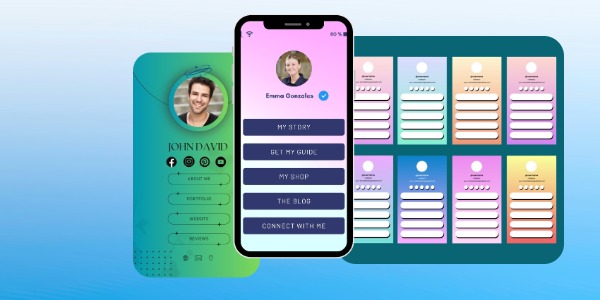
Choosing the right bio link template matters. Explore 10 expert-backed ways to increase clicks, improve branding, and scale your online presence.
A bio link template is a pre-designed layout that allows you to share multiple links through a single URL, typically placed in your social media bio. Instead of constantly changing your bio link every time you publish new content, you use one centralized page that directs visitors to your most important destinations—websites, products, videos, newsletters, or offers.
Bio link templates are no longer just a convenience. They have become a core digital asset for creators, businesses, and SaaS brands.
Why Bio Link Templates Are Essential Today
Social platforms still limit users to one clickable bio link. At the same time, audiences expect instant access to multiple touchpoints. A well-designed bio link template solves this problem by acting as a mini landing page optimized for mobile traffic, fast decision-making, and high engagement.
More importantly, modern bio link templates now serve three critical functions:
- Traffic control: You decide where users go first instead of relying on platform algorithms.
- Conversion optimization: Strategic layout, CTAs, and visual hierarchy guide visitors toward actions.
- Brand consistency: Your bio link becomes an extension of your visual identity, not a generic link list.
Why Bio Link Templates Matter Even More

Search behavior and content consumption have changed significantly. Users discover brands through short-form video, AI-driven recommendations, and social search—not just Google. This means your bio link template often becomes the first branded experience someone has with you.
The best bio link templates are built to support:
- Mobile-first design, as over 80% of bio link traffic comes from smartphones
- Fast loading speeds, aligned with Core Web Vitals and user expectations
- Platform-specific behavior, adapting to Instagram, TikTok, YouTube, and emerging networks
- AI-assisted personalization, enabling smarter link prioritization and content suggestions

Bio Link Template vs. Regular Landing Page
While a traditional landing page focuses on a single goal, a bio link template is designed for choice and flexibility. Visitors may want to watch a video, read a blog post, or buy a product—all in the same session. A good bio link template balances simplicity with functionality, without overwhelming the user.
That balance is exactly why choosing the right bio link template is no longer optional. It directly affects how people perceive your brand, how long they stay, and whether they click or leave.
In the next section, we’ll explore how the right bio link template can significantly improve click-through rates and conversions, and why small design decisions can make a measurable difference.
How Bio Link Templates Impact Click-Through Rate and Conversions
A bio link template isn’t just a cosmetic accessory for your social profile — it’s a strategic conversion asset that affects real business outcomes like clicks, sign-ups, and revenue.
Here’s how and why.
Actual Performance Benchmarks
Click-through rate (CTR) measures how many people click a link compared to how many people saw it (clicks ÷ views × 100). Historically used to evaluate ads and email campaigns, CTR remains one of the most reliable performance indicators for bio link pages as well. Wikipedia
Recent creator data shows:
- Bio link templates typically generate CTRs of about 2–3% from profile visits. A 2% CTR means if 1,000 visitors reach your profile, roughly 20–30 will click your bio link. Napolify
- For optimized profiles — with strong calls to action and clear value propositions — CTRs can reach 8–20%, demonstrating how layout and messaging directly affect results. Napolify

These numbers matter because every extra click increases the opportunity for a conversion (e.g., newsletter sign-ups, product purchases, lead magnet downloads). A well-designed bio link template turns occasional visitors into engaged prospects.
Why Conversions Depend on Design and Strategy
User experience and clarity matter more than ever. Poorly structured bio links — cluttered options, vague text, or slow loading — frustrate visitors and drive them away before they even engage.
Some factors that influence CTR and conversions:
- Mobile-first layouts: Because the majority of bio link traffic comes from mobile devices, templates that adapt fluidly to phones reduce friction and boost clicks. BITHUB
- Clear, prioritized CTAs: Research shows that visitors engage more when presented with a single primary action first (e.g., “Subscribe to Free Guide”) followed by secondary options. whoozit
- Analytic-driven adjustments: Monitoring which link elements perform best enables you to reorder or update links for maximum engagement. AstroLink
According to optimization guides, fast load times, uncluttered visuals, and clear value propositions can increase click-through rates by multiple times compared to basic or generic bio link pages. BITHUB
Real-World Examples of Impact
Here are concrete scenarios that illustrate why bio link templates matter:
- Creators and Monetization: Digital creators who optimize their bio link often use lead magnets or priority offers first — and see far higher engagement because followers immediately understand the value on offer. memberspace.com
- Small Businesses: When a brand like Glossier uses a structured bio link page with featured products and testimonials, it creates both a serviceable sales hub and a trust signal that encourages deeper browsing and spending. swarm.to
- Influencers and Growth: Templates that weave story, identity, and direct engagement links (e.g., “Join Our Workshop,” “Watch Now”) help creators not just retain attention but also convert it into measurable actions (newsletter sign-ups, community joins, event registrations). Medium
What This Means for Your Strategy
Without a structured bio link template:
- You lose visitors before they ever see your content or offers.
- You miss opportunities to nurture leads.
- You miss critical performance insights (because analytics are tied to how your template is set up).
With the right template, you create a funnel that captures, guides, and converts — all from the single link in your social bio.
Key Features Every High-Converting Bio Link Template Must Have

When selecting a bio link template, appearance alone isn’t enough. To truly drive click-through rates (CTR) and conversions, your template must be intentionally designed around how people consume content today and how platforms serve traffic. Below are the critical features that separate high-performing templates from the rest.
1. Mobile-First Responsive Design
Most bio link traffic comes from mobile devices, where smaller screens demand a clean design and intuitive hierarchy. A responsive layout ensures that buttons, links, and interactive elements adjust seamlessly.
Example: A two-column grid that becomes a single column on smaller screens improves usability and reduces accidental taps.
Stat Insight: With mobile accounting for over 55% of web traffic globally, mobile responsiveness isn’t optional — it’s required for engagement. [Statista]
2. Clear and Prioritized Calls to Action (CTAs)
Your template should make it easy for users to take the most valuable action first.
- Primary CTA: Featured prominently at the top (“Subscribe,” “Shop Now,” “Watch Video”)
- Secondary CTAs: Supporting actions (“Read Blog,” “Contact Us”)
Example: A template that highlights your newest offer in a bold button above the fold tends to convert better than a list of equal-weighted links.
Quote: As UX designer Steve Krug famously said:
“Don’t make me think.”
Your visitors should immediately understand what to click next without hesitation.
3. Fast Load Time and Lightweight Code
Page speed directly impacts user behavior and SEO. In bio link templates, slow-loading elements — especially images or scripts — can kill conversions before they happen.
Best Practice: Keep images optimized, avoid heavy libraries, and use modern formats like WebP.
Stat Insight: According to Google, the probability of bounce increases by 32% as page load time goes from 1s to 3s. [Google Developer]
4. Visual Hierarchy and Readability
An effective bio link template uses spacing, typography, and color contrast strategically.
- Larger, bold text for key messages
- Adequate whitespace to separate sections
- High contrast between buttons and background
Example: Use a darker background with light text for feature highlights, then switch to a lighter background for additional links — this shift guides the eye naturally.
5. Analytics and Click-Tracking Integration
You can’t optimize what you don’t measure. Modern bio link templates should include analytics integration that captures:
- Which links get the most clicks
- Time spent on the bio link page
- Devices and platforms used by visitors
This data helps you refine your CTA placement and prioritize high-performing content.
Tool Examples: Many templates connect with Google Analytics, Mixpanel, or built-in SaaS dashboards.
6. Custom Branding and Visual Consistency
Your bio link page is an extension of your brand. Templates that support:
- Custom fonts
- Brand colors
- Logo placement
- Custom backgrounds
allow you to maintain consistency across platforms and strengthen recognition.
Example: A fitness creator using bold blues and clean lines reinforces strength and reliability.
7. Support for Multiple Content Formats
High-converting templates go beyond simple links. They support:
- Embedded videos
- Image galleries
- Testimonials or mini portfolios
- Product previews
When visitors can see value immediately, engagement increases.
8. Accessibility and Inclusive Design
With users of all abilities accessing your content, accessibility features are no longer optional:
- Screen reader support
- Clear focus states
- Sufficient color contrast
- Text alternatives for media
Stat Insight: One in four adults experiences a disability that affects media use; accessible design broadens your audience and improves SEO.
9. AI-Ready Personalization Hooks
AI is now part of content optimization:
- Dynamic CTAs based on time of day
- Adaptive link prioritization based on engagement
- Smart recommendations
Templates that support AI personalization can deliver higher relevance and stronger conversion pathways.
10. Scalability for Long-Term Use
Your bio link template shouldn’t feel outdated for months. Look for templates that:
- Support frequent content updates
- Upload new assets easily
- Scale with audience growth
This future-proofing prevents you from migrating links and losing SEO momentum.
What This Means for You
Choosing a bio link template that checks these feature boxes doesn’t just make your link page functional — it makes it strategic. You’re no longer directing followers to a static list; you’re guiding them through a thoughtful journey that prioritizes your best content and highest-value actions.
Way #1: Choose a Bio Link Template Optimized for Mobile-First Users
If there is one non-negotiable rule when choosing a bio link template, it is this: mobile comes first, not second.
The overwhelming majority of bio link traffic originates from mobile devices—specifically from social apps like Instagram, TikTok, YouTube, and X. Users are not browsing casually; they are scrolling fast, making split-second decisions, and abandoning pages that feel slow or confusing.
Why Mobile-First Is Critical
A mobile-first bio link template is not simply “responsive.” It is designed from the ground up for thumbs, small screens, and short attention spans.
According to Statista, mobile devices account for over 58% of global website traffic, and the percentage is even higher for social-driven traffic. For platforms like TikTok and Instagram, mobile usage exceeds 90% of total interactions.
This means your bio link template must perform flawlessly on mobile—or it will fail by default.
What a Mobile-Optimized Bio Link Template Looks Like
A high-quality mobile-first bio link template typically includes:
- Large, thumb-friendly buttons (minimum 44px height)
- Single-column layout with clear vertical flow
- Minimal text with strong visual hierarchy
- Fast loading even on mobile networks
- No horizontal scrolling or zooming

Example:
A creator promoting a course might place one bold CTA button (“Get the Free Lesson”) at the top, followed by smaller secondary links. On mobile, this immediately communicates value without overwhelming the user.
Mobile UX Directly Affects Click-Through Rates
Google’s UX research shows that 53% of users abandon a mobile page if it takes longer than 3 seconds to load. Even worse, cluttered layouts increase cognitive load and reduce interaction.
In practical terms:
- A poorly optimized bio link template may get profile views, but few clicks
- A mobile-first template can double or triple engagement simply by improving layout and speed
As Google UX expert Luke Wroblewski famously stated:
“Mobile forces you to focus.”
That focus is exactly what converts visitors into action-takers.
Mobile-First vs Desktop-First: A Common Mistake
Many users choose bio link templates that look great on desktop previews but feel cramped on phones. This often results in:
- Too many links above the fold
- Small text and hard-to-tap buttons
- Visual clutter that distracts from the main CTA
This approach is outdated. The correct workflow is:
Design for mobile → enhance for desktop, not the other way around.
What to Check Before Choosing a Template
Before committing to a bio link template, test it by asking:
- Can I tap every button comfortably with one thumb?
- Is the main CTA visible without scrolling?
- Does the page load instantly on 4G/5G?
- Does it feel natural inside a social app browser?
If the answer is “no” to any of these, keep looking.
Choosing a mobile-first bio link template sets the foundation for everything else—branding, analytics, monetization, and growth.
Way #2: Look for Customizable Branding Without Design Skills

Your bio link template is often the first branded touchpoint someone experiences. If it looks generic or disconnected from your identity, trust drops immediately—even if your content is strong.
The challenge? Most creators and businesses are not designers. That’s why the best bio link templates offer deep branding flexibility without requiring design skills.
Why Branding Matters More Than Ever
Modern users make credibility judgments in seconds. According to research from Stanford’s Web Credibility Project, 75% of users judge a brand’s credibility based on visual design alone.
If your bio link template:
- Uses default colors
- Looks identical to thousands of others
- Doesn’t reflect your brand personality
…you lose authority before the first click.
What “Customizable Without Design Skills” Really Means
A high-quality bio link template should let you customize key brand elements easily, such as:
- Brand colors (primary, secondary, accent)
- Typography (modern, readable fonts)
- Button styles (rounded, flat, gradient)
- Backgrounds (solid, gradient, subtle blur)
- Logo or profile image placement
All of this should be done through simple controls, not CSS, code editors, or design tools.
Example:
A SaaS founder using a blue-based brand can instantly apply their palette across buttons, headings, and backgrounds—creating a cohesive experience that matches their website and product UI.
Consistency Builds Recognition and Trust
Marketing studies consistently show that brand consistency can increase revenue by up to 23%. When users see the same visual language across social media, websites, and bio links, they feel more confident engaging.
This consistency also helps with:
- Brand recall
- Professional perception
- Higher conversion rates
As branding expert Marty Neumeier puts it:
“A brand is not what you say it is. It’s what they say it is.”
Your bio link template directly shapes that perception.
Avoid Overdesign and Visual Noise
Customization does not mean complexity. Many creators make the mistake of:
- Using too many colors
- Mixing unrelated fonts
- Adding excessive animations
The best bio link templates guide you toward clean, modern defaults, while still allowing personalization.
A good rule:
- One primary color
- One accent color
- One neutral background
This keeps the focus on action, not decoration.
What to Look for When Evaluating Templates
Before choosing a bio link template, ask:
- Can I match my brand colors exactly?
- Can I preview changes instantly?
- Does the template still look clean if I change fonts?
- Will it remain readable on mobile?
If customization feels overwhelming or limited, the template is not future-proof.
Once your bio link template reflects your brand clearly and effortlessly, it becomes more than a link—it becomes a recognizable digital asset.
Way #3: Prioritize Speed, Performance, and Core Web Vitals
Speed is no longer a technical detail—it is a competitive advantage. A bio link template that looks great but loads slowly will silently destroy engagement, clicks, and trust.
Users coming from social platforms are impatient by default. They expect your bio link page to load instantly, especially when accessed inside in-app browsers like Instagram or TikTok.
Why Performance Directly Impacts Conversions
Google has been clear for years: performance affects user behavior. But what’s changed is how unforgiving users have become.
According to Google research:
- 53% of mobile users abandon a page that takes longer than 3 seconds to load
- A 1-second delay in page load time can reduce conversions by up to 20%
This applies even more strongly to bio link pages, where users did not intend to “browse”—they intended to act.

As Google’s former Web Performance Lead, Addy Osmani, stated:
“Fast is what users expect. Slow is what makes them leave.”
Understanding Core Web Vitals (Simply)
Core Web Vitals are Google’s user-experience performance metrics. Even though a bio link template is small, these metrics still matter:
- Largest Contentful Paint (LCP): How fast the main content loads
- Interaction to Next Paint (INP): How responsive buttons and links feel
- Cumulative Layout Shift (CLS): Whether elements jump around while loading
A well-built bio link template should feel stable, instant, and responsive, even on slower connections.
Common Performance Killers in Bio Link Templates
Many templates fail not because of content, but because of poor technical choices:
- Heavy background images or videos
- Unoptimized images (no compression or WebP)
- Excessive animations and scripts
- Third-party trackers are loading before the content
- Bloated frameworks for simple pages
Each of these adds milliseconds that compound into lost clicks.
Example:
A creator uses a bio link template with a full-screen video background. While visually impressive, it adds 2–3 seconds to load time. The result? Fewer clicks than a simpler, faster layout.
Speed Builds Trust (Subconsciously)
Users associate speed with professionalism. When a page loads instantly, it signals:
- Technical competence
- Reliability
- Security
This is especially important for:
- SaaS products
- Paid offers
- Email sign-ups
- Checkout redirects
Slow pages raise doubt—even if the user cannot explain why.
What to Look for in a Fast Bio Link Template
Before choosing a template, verify that it:
- Loads fully in under 2 seconds on mobile
- Uses optimized images and modern formats
- Avoids unnecessary scripts
- Feels responsive when tapping links
- Does not shift layout while loading
If possible, test it using tools like PageSpeed Insights or simply by opening it on a mobile device with standard data.
A fast bio link template doesn’t just improve performance metrics—it protects every other effort you make, from branding to content to monetization.
Way #4: Select a Bio Link Template Built for Social Platform Algorithms
Success with a bio link template is not only about design or speed—it’s about context. Social platforms no longer treat outbound links neutrally. They evaluate behavior, engagement patterns, and user satisfaction signals before deciding how often your profile and content are shown.
This means your bio link template must work with platform algorithms, not against them.
Why Platform Context Matters
Every major platform—Instagram, TikTok, YouTube, X, and emerging social search engines—monitors what happens before and after a user clicks your bio link.
If users:
- Click your bio link
- Stay engaged
- Interact with multiple elements
- Do not bounce immediately
Platforms interpret this as a positive experience, which can indirectly support profile visibility and reach.
While social networks rarely disclose full algorithm details, multiple creator studies and platform insights confirm one pattern:
Positive off-platform behavior reinforces on-platform performance.
Algorithm-Friendly Bio Link Behavior
A bio link template optimized for social algorithms encourages:
- Quick clarity: Users instantly understand what the page offers
- Multiple interactions: Visitors click more than one element
- Low bounce rates: They don’t return immediately to the platform
This creates a behavioral loop that benefits both the user and the platform.
Example:
A creator places a featured CTA at the top (“Watch the Latest Video”) followed by supporting links (“Free Guide,” “Join Community”). Users often click more than once, increasing dwell time and engagement signals.
Platform-Specific Design Considerations
A strong bio link template adapts to how each platform sends traffic:
- Instagram & TikTok: Short attention span, visual-first, fast decisions
- YouTube: Longer intent, curiosity-driven clicks
- X (Twitter): Text-oriented, value-driven exploration
A one-size-fits-all template ignores these nuances. A well-designed one anticipates them.
Avoid Patterns That Hurt Visibility
Some bio link templates unintentionally trigger negative signals:
- Aggressive pop-ups that interrupt interaction
- Immediate redirects without user choice
- Overloaded pages with too many options
- Misleading CTAs that cause quick exits
These patterns increase bounce behavior and reduce user satisfaction.
As growth strategist Julian Shapiro noted:
“Distribution favors experiences that feel native, not extractive.”
Your bio link template should feel like a natural extension of the platform—not a detour.
What to Look for in an Algorithm-Aware Template
When evaluating a bio link template, ask:
- Does it feel natural inside a social app browser?
- Does it encourage more than one interaction?
- Is the value immediately clear?
- Does it respect the user’s intent?
Templates that prioritize engagement flow over aggressive conversion tend to perform better long-term.
Way #5: Make Sure the Template Supports Multiple Content Types
Audiences no longer consume content in a single format. They switch constantly between video, text, audio, products, and interactive experiences. A modern bio link template must reflect this reality.
If your template only supports plain text links, it limits how effectively you can communicate value—and how deeply users can engage.
Why Content Variety Drives Engagement
Different users respond to different formats:
- Some want to watch before they read
- Others prefer to scan text quickly
- Some are ready to buy immediately
A bio link template that supports multiple content types allows visitors to choose how they engage, which increases both satisfaction and conversion potential.
Marketing research consistently shows that interactive and visual content leads to higher engagement and longer session duration compared to static link lists.
Content Types a Strong Bio Link Template Should Support
A future-ready bio link template should allow you to include:
- Video embeds (short previews, tutorials, announcements)
- Image blocks (product visuals, portfolio samples)
- Text highlights (announcements, context, value statements)
- Buttons with icons (visual cues improve click clarity)
- Product or offer cards (pricing, features, or bundles)
- Testimonials or social proof snippets
Example:
A SaaS founder embeds a short explainer video at the top of the bio link page, followed by a free trial button and a case study link. This layered approach captures both curious and ready-to-convert users.
Why Plain Link Lists Are No Longer Enough
Traditional bio link pages were designed for simplicity, not persuasion. Users expect:
- Context before clicking
- Visual confirmation of value
- Reduced uncertainty
A link labeled “My Course” performs worse than:
“Free AI Course — Start in 5 Minutes”
Especially when paired with a visual or icon.
Content Flexibility Supports Rapid Updates
Social trends move fast. A good bio link template lets you:
- Swap featured content instantly
- Promote time-sensitive offers
- Highlight new videos or posts
- Remove outdated links without redesigning the page
This agility is critical for creators, marketers, and businesses responding to real-time demand.
Balance Variety with Focus
More content types do not mean more clutter. The best bio link templates:
- Highlight one primary content block
- Use secondary formats to support—not distract
- Maintain a clear visual hierarchy
If everything competes for attention, nothing converts.
What to Verify Before Choosing a Template
Ask yourself:
- Can I embed video or rich media easily?
- Can I add context to links, not just titles?
- Can I rearrange content without breaking the layout?
- Does the page still feel clean with mixed content?
A bio link template that supports multiple content types gives you creative freedom without sacrificing clarity—a critical balance.
Way #6: Choose Templates with Built-In Analytics and Click Tracking

Intuition alone is no longer enough. If your bio link template does not provide clear performance data, you are operating in the dark. Analytics transform your bio link from a static page into a measurable growth tool.
The difference between a good bio link and a high-performing one is often not design, but data-driven decisions.
Why Analytics Matter for Bio Link Performance
Every click tells a story:
- What users care about
- What they ignore
- Where they hesitate
- What actually converts
Without analytics, you cannot:
- Optimize link order
- Improve CTA wording
- Identify high-value traffic sources
- Understand audience behavior
According to McKinsey, data-driven organizations are 23× more likely to acquire customers than those relying on guesswork. The same principle applies at the micro-level of bio links.
What “Built-In Analytics” Should Include
A modern bio link template should provide analytics that are simple, actionable, and real-time, including:
- Click counts per link
- Top-performing CTAs
- Traffic source insights (platform, device)
- Daily and weekly trends
- Conversion signals (if supported)
Example:
A creator notices that their “Free Guide” link gets three times more clicks than their “Shop” link. They move the guide to the top and use it as a lead-in to monetized offers—improving overall conversions.
Why External Analytics Alone Are Not Enough
While tools like Google Analytics are powerful, they can be:
- Overwhelming for beginners
- Slower to interpret
- Less specific to link-level behavior
Built-in bio link analytics remove friction by showing exactly what matters, without configuration or technical knowledge.
This aligns with a growing SaaS trend toward insight over raw data.
Tracking Enables Continuous Optimization
High-performing bio link pages are not “set and forget.” They evolve based on data:
- Swap CTA text based on click rate
- Reorder links weekly
- Remove underperforming content
- Double down on what works
This process compounds results over time.
As growth expert Sean Ellis once stated:
“You don’t grow by guessing. You grow by testing.”
Privacy and Compliance Still Matter
Analytics must also respect user privacy. Look for templates that:
- Avoid invasive tracking
- Offer GDPR-friendly data handling
- Do not rely on third-party cookies
Trust and compliance are part of performance.
What to Check Before Choosing a Template
Before committing, ask:
- Can I see clicks per link?
- Can I compare performance over time?
- Are insights easy to understand?
- Does it respect privacy standards?
Analytics turns your bio link template into a feedback loop—one that continuously improves results with minimal effort.
Way #7: Ensure Your Bio Link Template Is SEO-Friendly and Indexable
SEO is no longer limited to long-form blogs and traditional websites. Bio link pages are now searchable assets, increasingly discovered through Google, social search, and AI-powered assistants. If your bio link template is not SEO-friendly, you are leaving organic visibility on the table.
While many people assume bio links are only for social traffic, the reality is different: modern bio link pages can rank, be indexed, and appear in AI summaries when built correctly.
Why SEO Still Matters for Bio Link Templates
Search engines and AI systems prioritize:
- Clear structure
- Meaningful content
- Fast performance
- Proper metadata
A bio link template that ignores these fundamentals becomes invisible outside of direct social clicks.
In contrast, SEO-friendly templates allow your bio link to:
- Appear in branded searches
- Show up in social search results
- Be referenced by AI overviews and assistants
- Support topical authority around your brand
What Makes a Bio Link Template SEO-Friendly
An optimized bio link template should include:
- Clean HTML structure (proper headings and semantic elements)
- Indexable URLs (not blocked by noindex tags)
- Custom page titles and meta descriptions
- Alt text support for images
- Readable, crawlable content (not everything hidden behind scripts)
Example:
A creator adds a short, keyword-aware intro to their bio link page (“Official links, tools, and resources from…”), which helps search engines understand the page context.
Avoid Common SEO Mistakes
Many bio link templates unintentionally block discoverability by:
- Using JavaScript-heavy rendering with no fallback
- Preventing indexing by default
- Offering no control over meta tags
- Loading content dynamically without crawlable text
These choices may simplify development, but they harm long-term visibility.
Bio Links and AI Search
AI-powered search engines prioritize concise, structured, trustworthy pages. A well-built bio link template fits this perfectly when it:
- Clearly states who it belongs to
- Lists authoritative resources
- Links to relevant, trusted destinations
This increases the chance of your bio link being cited or referenced in AI-generated answers.
SEO Without Over-Optimization
The goal is not to turn your bio link into a blog post. The goal is clarity.
Good SEO in this context means:
- Simple explanations
- Accurate descriptions
- Honest linking
- Clean structure
When search engines understand your page easily, users benefit too.
What to Verify Before Choosing a Template
Before selecting a bio link template, confirm:
- Can I edit the page title and description?
- Is the page indexable by default?
- Does the content render without heavy scripts?
- Is the structure readable by search engines?
Way #8: Look for Conversion-Focused Design Elements
A bio link template can be visually appealing and technically sound, yet still fail to convert. The difference lies in conversion-focused design—the intentional use of layout, visuals, and psychology to guide users toward action.
High-performing bio link templates are built with decision-making in mind, not decoration.
What Conversion-Focused Design Really Means
Conversion-focused design is about reducing friction and increasing clarity. Instead of asking users to figure out what to do next, the template quietly leads them there.
Key principles include:
- Clear visual hierarchy
- Strong contrast between CTAs and background
- Minimal distractions
- Intentional spacing and alignment
These elements work together to make the action feel natural.
Small Design Choices, Big Impact
Minor adjustments can significantly affect performance:
- Button color contrast improves visibility and click confidence
- Whitespace reduces cognitive load
- Consistent button shapes create familiarity
- Directional cues (icons, arrows) guide attention
Example:
A single highlighted CTA button (“Start Free Trial”) with ample spacing outperforms a cluster of equally styled links—even when the offer remains the same.
According to UX research, users scan pages in predictable patterns. Templates that respect these patterns convert more reliably.
Trust Signals Increase Click Confidence
Users are more likely to click when they feel safe and informed. Conversion-focused bio link templates often include subtle trust signals such as:
- Short testimonials
- Social proof counters
- Verification icons
- Clear labels (e.g., “Official link”)
These elements reduce hesitation without overwhelming the layout.
As behavioral economist Daniel Kahneman noted:
“People choose not because they are logical, but because they feel confident.”
Reduce Choice Overload
One of the most common conversion mistakes is offering too many equal choices. When everything is emphasized, nothing is.
Effective bio link templates:
- Highlight one primary action
- Group secondary links logically
- De-emphasize low-priority options
This structure respects user attention and improves completion rates.
What to Look for When Evaluating Templates
Before choosing a bio link template, ask:
- Is there a clear primary CTA?
- Does the design guide my eyes naturally?
- Are secondary actions visually subordinate?
- Does the layout feel calm, not crowded?
Conversion-focused design turns traffic into outcomes. It ensures that every visitor understands what to do—and feels comfortable doing it.
Way #9: Check Compatibility with AI Tools and Automation
A bio link template that cannot integrate with AI and automation workflows is already behind. As content volume, platforms, and audience expectations grow, manual updates do not scale. Smart creators and businesses rely on automation to stay consistent, relevant, and responsive.
Your bio link template should support this shift—not block it.
Why AI Compatibility Matters for Bio Links
AI is no longer limited to content creation. It now plays a role in:
- Content prioritization
- Personalization
- Performance optimization
- Workflow automation
A bio link template that works well with AI tools allows you to react faster and make smarter decisions without constant manual effort.
Example:
A creator uses AI analytics to identify which content is trending, then automatically surfaces that link at the top of their bio link page—without editing the page manually each time.
Practical AI and Automation Use Cases
Modern bio link templates increasingly support or integrate with:
- Dynamic link ordering based on performance or recency
- Scheduled content swaps (campaigns, launches, events)
- AI-driven recommendations for featured links
- Automated A/B testing for CTA text or placement
- Webhook or API access for custom workflows
These capabilities turn a static bio link into a living system.
AI Improves Relevance, Not Just Efficiency
One of the biggest advantages of AI compatibility is relevance. Instead of showing the same links to every visitor, intelligent systems can adapt based on:
- Time of day
- Platform source
- Past engagement trends
- Campaign context
This personalization increases engagement without increasing complexity for the user.
Avoid Templates That Lock You In
Some bio link templates are closed systems. They:
- Offer no integrations
- Restrict automation
- Require manual changes for every update
While these may work initially, they become friction points as your audience grows.
A future-ready bio link template should connect easily with:
- Email marketing tools
- CRM platforms
- Analytics systems
- Automation services
What to Verify Before Choosing a Template
Before committing, ask:
- Can this template integrate with AI or automation tools?
- Does it support dynamic or scheduled changes?
- Is there an API, webhook, or integration layer?
- Will it scale with my workflow?
Way #10: Pick a Bio Link Template That Scales with Your Brand
A bio link template should not just work for where you are today—it should support where your brand is going next. Many people choose templates based on immediate needs, only to outgrow them months later. Scalability is a critical selection factor.
A scalable bio link template grows with your audience, content, and business goals without forcing a redesign or migration.
Why Scalability Matters More Than Ever
As your brand evolves, your bio link needs to change:
- More content to promote
- Multiple offers or funnels
- Different audiences across platforms
- New monetization models
If your template cannot adapt, it becomes a bottleneck.
Example:
A creator starts with three links. Six months later, they launch a product, add a newsletter, partner links, and a community. A rigid template turns into clutter—or worse, requires rebuilding from scratch.
Signs of a Scalable Bio Link Template
A future-proof bio link template typically supports:
- Unlimited or flexible link blocks
- Section grouping (e.g., “Start Here,” “Resources,” “Offers”)
- Role-based layouts for creators, businesses, or teams
- Easy expansion without design breakdown
- Consistent performance as content grows
Scalability is not about adding everything—it’s about handling growth gracefully.
Scaling Without Losing Clarity
One common fear is that more content equals more confusion. Well-designed templates solve this by:
- Introducing sections progressively
- Keeping one primary CTA
- Using visual separation to guide navigation
This allows your bio link to expand without overwhelming users.
Long-Term Brand Control
A scalable bio link template also protects your brand:
- Custom domains instead of platform URLs
- Exportable data and analytics
- Ownership over layout and content
- Freedom to evolve without lock-in
These factors matter as your brand becomes more valuable.
As product strategist, Gibson Biddle once said:
“Strategy is about making choices that scale.”
Your bio link template is one of those choices.
What to Confirm Before Choosing
Before finalizing your bio link template, ask:
- Will this still work if my audience doubles?
- Can I add new sections without redesign?
- Does it support future products or services?
- Am I locked into a fixed structure?
Choosing a scalable bio link template ensures longevity, flexibility, and consistency as your brand grows.
Common Mistakes to Avoid When Choosing a Bio Link Template
Even with a clear framework, many creators and businesses still choose the wrong bio link template—not because of lack of options, but because of avoidable mistakes. These errors often don’t show immediate consequences, yet over time they quietly reduce clicks, trust, and growth.
Understanding what not to do is just as important as knowing what to prioritize.
1. Choosing Style Over Usability
A visually striking template can be tempting, but aesthetics alone do not convert. Overdesigned templates often suffer from:
- Poor readability
- Confusing layouts
- Slow load times
If users struggle to understand what to click, they leave.
Rule of thumb: If it looks impressive but feels awkward to use on mobile, it’s not the right choice.
2. Using Too Many Equal-Priority Links
Presenting ten links with the same size, color, and weight forces users to decide—many won’t.
This leads to choice paralysis, where visitors exit without clicking anything.
High-performing bio link templates:
- Highlight one primary action
- De-emphasize secondary links
- Guide attention intentionally
Clarity always beats completeness.
3. Ignoring Performance and Speed
Some templates sacrifice speed for effects like animations or background media. While these may look modern, they often increase bounce rates.
If your bio link takes more than a couple of seconds to load, users will not wait—especially inside social app browsers.
Speed is invisible when done right, and painfully obvious when done wrong.
4. Relying on Generic, Unbranded Templates
Using a default template without customization weakens brand identity. Visitors may not remember you, or worse, confuse your page with someone else’s.
Your bio link should feel like an extension of your brand, not a placeholder.
5. Skipping Analytics Entirely
Without tracking, you have no way to know:
- Which links perform best
- What content resonates
- Where users drop off
This leads to stagnant pages that never improve.
Even basic analytics can uncover valuable insights.
6. Overlooking SEO and Indexability
Some bio link templates block search engines by default or hide content behind scripts. This eliminates potential organic visibility and AI discoverability.
While social traffic is primary, search visibility is a bonus you shouldn’t ignore.
7. Locking Yourself into a Rigid System
Templates that:
- Don’t allow exports
- Limit customization
- Restrict integrations
becomes problematic as your needs evolve.
Flexibility matters more than convenience in the long run.
Final Takeaway
Most bio link failures aren’t caused by lack of features—they’re caused by misaligned priorities. The best bio link template is not the flashiest, but the one that quietly supports clarity, performance, branding, and growth.
Next, we’ll compare Free vs Paid Bio Link Templates to help you decide which option makes the most sense for your goals and stage of growth.