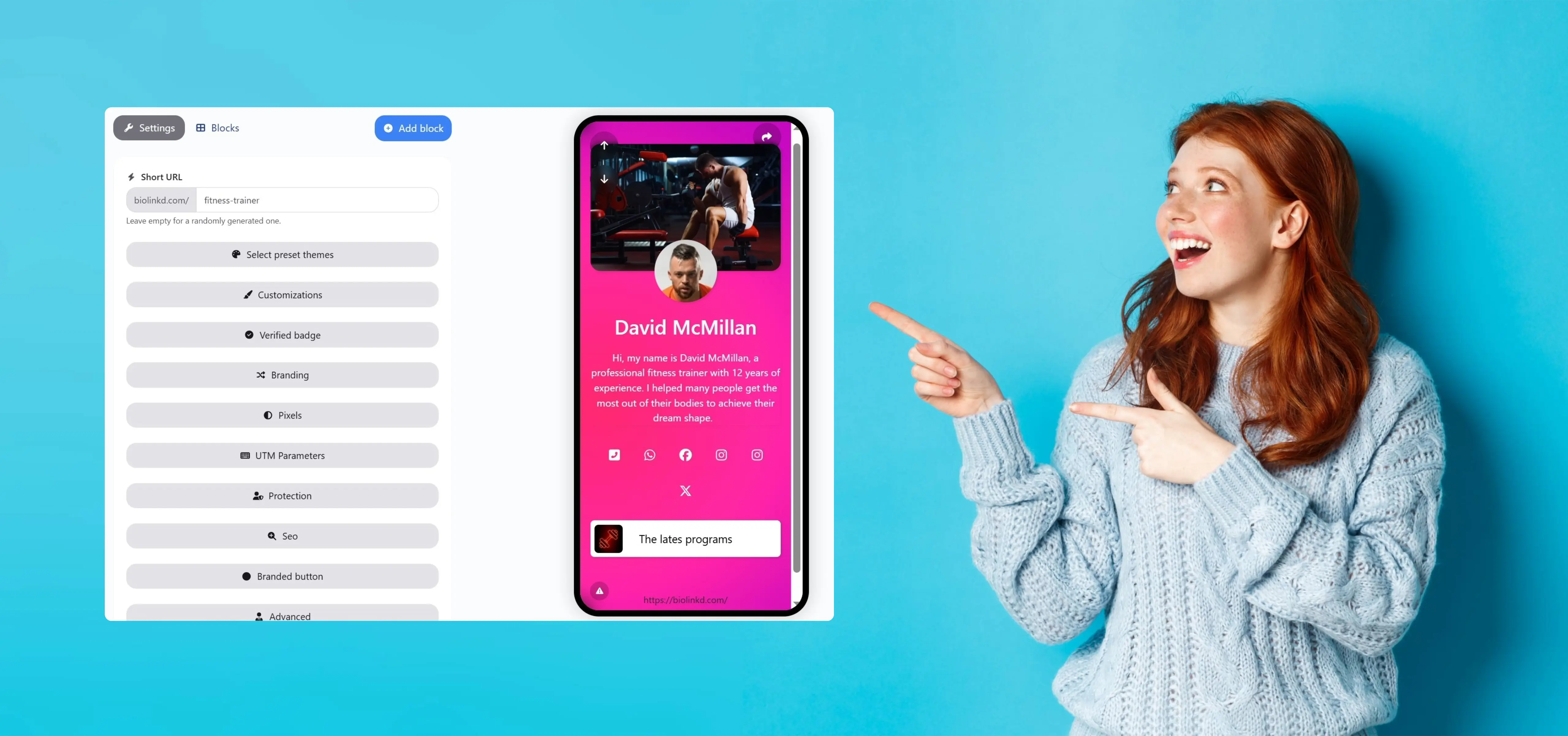
Learn how to create a pro bio link that converts. Step-by-step guide to building a high-performing link-in-bio mini landing page for creators and brands.
Let’s be honest—most bio links look the same. A logo at the top, a long list of buttons, and no clear reason for a visitor to click anything. That’s not a professional bio link. It’s just a digital dumping ground for links.
A pro bio link is different. It’s intentional. It has a clear goal, a clean structure, and a flow that guides visitors instead of overwhelming them. Think of it less as a list of links and more as a mini landing page designed to convert—whether that conversion is a sale, a signup, or a click to your best content.
In 2026, your bio link is often the first real interaction someone has with your brand. People discover you on Instagram, TikTok, X, or YouTube, tap your link-in-bio, and make a decision in seconds: Do I trust this person? Is this worth my time? A professional bio link answers those questions immediately.
The good news is that creating a pro bio link doesn’t require advanced design skills or a full website. It requires clarity, strategy, and a few smart choices. In this guide, we’ll break down exactly how to create a high-converting, SEO-friendly bio link that looks professional, feels human, and actually works—step by step.
By the end, you won’t just have a link-in-bio page. You’ll have a focused traffic hub that supports your content, your brand, and your growth.
2. Understanding the Goal of Your Bio Link

Before you learn how to create a bio link that truly performs, you need to be clear on why you’re building it in the first place. Too many people treat the link-in-bio as an afterthought — something they slap into Instagram or TikTok and forget about. That’s a missed opportunity.
A pro bio link is not just a list of URLs. It’s a purpose-driven hub that channels your social traffic toward measurable outcomes, whether that’s growing your audience, driving sales, collecting leads, or showcasing your best work.
Here’s a reality check: recent industry benchmarks show that well-optimized link-in-bio click-through rates (CTR) average about 4.7% on social profiles in 2026. That means out of every 100 people who visit your profile, nearly five will click your bio link if it’s compelling enough. However, as competition for attention intensifies, those numbers can dip if your bio link doesn’t match the interests and expectations of your audience. Napolify
That statistic underscores an important point: your bio link strategy should be intentional, not accidental. You aren’t just placing another link on a profile — you are building a conversion path.
To define your bio link goal, ask yourself:
1. What is my primary action?
Are you trying to drive people to a shop button? A newsletter sign-up? Or perhaps a product launch? Knowing this from the start helps you create bio link elements that push visitors toward that action.
2. Who are your visitors and what do they expect?
Someone coming from a viral TikTok video might be ready to engage instantly, while an Instagram profile visitor might be curious to explore your ecosystem of content. Tailoring your link-in-bio strategy to audience intent improves results.
3. How will you measure success?
Metrics like CTR, conversion rate, sign-ups, or purchases should be tied to your bio link performance. Measuring outcomes turns your bio link from a static resource into a strategic growth tool.
As marketer and author Jay Baer once said, “If you don’t listen, you don’t lead.” Knowing what your audience is looking for — and aligning your bio link to that need — is the first step in becoming a leader rather than just another profile with a forgotten URL.
3. Choosing the Right Platform to Create a Pro Bio Link

Once your goal is clear, the next step is choosing where to create your bio link. This decision matters more than most people think. The platform you use will directly affect how professional your link-in-bio looks, how fast it loads, and how much control you have over conversions and branding.
Many beginners rush this step and pick the first tool they see. A pro approach is different. You choose a platform based on strategy, not convenience.
Hosted bio link tools vs. custom solutions
When you create a bio link, you usually have two main options:
Hosted bio link platforms
These are tools like Linktree, Biolinkd, Beacons, or similar services. They are fast to set up, beginner-friendly, and optimized for mobile. For most creators and businesses, this is the smartest starting point because you can launch quickly without technical knowledge.
Custom or self-hosted bio links
This approach involves creating your own mini landing page on a website or CMS. While it offers maximum control, it requires more time, design skills, and maintenance. It’s often better suited for advanced brands or teams with technical resources.
For most people looking to create a pro bio link, a modern hosted platform with strong customization and analytics is the best balance between speed and performance.
What really matters when choosing a bio link tool
Instead of focusing on brand names, focus on capabilities. A professional link-in-bio platform should allow you to:
- Customize design elements so your bio link matches your brand
- Use clear, clickable buttons with flexible layouts
- Track clicks and user behavior with built-in analytics
- Optimize page speed for mobile users
- Edit and update links instantly without changing your profile URL
According to data shared by Google, 53% of mobile users abandon a page if it takes longer than 3 seconds to load. That alone makes performance a non-negotiable factor when choosing where to create your bio link. Speed is not just a technical detail — it directly affects trust and conversions.
Don’t choose tools based on trends alone
A common mistake is selecting a bio link platform simply because “everyone is using it.” What works for a lifestyle influencer may not work for a SaaS founder or an online coach. As we discussed earlier, your bio link exists to serve a specific goal — and your platform should support that goal, not limit it.
Marketing expert Ann Handley sums this up perfectly:
“Good marketing makes the company look smart. Great marketing makes the customer feel smart.”
The right bio link platform helps visitors feel confident, guided, and respected — not confused or overwhelmed.
Choosing the right platform is not about features for the sake of features. It’s about creating a bio link that feels intentional, professional, and aligned with how you want people to experience your brand.
When you get this step right, everything that follows — design, copy, SEO, and conversions — becomes significantly easier.
4. Structuring Your Bio Link Like a High-Converting Mini Landing Page
Now that you’ve chosen the right platform, it’s time to focus on structure. This is where many people go wrong. They create a bio link, add ten links in random order, and assume the job is done. As we said earlier, a pro bio link is not a link list — it’s a mini landing page with a clear hierarchy.
When you create a bio link with structure in mind, you guide the visitor’s attention instead of forcing them to think. And on mobile, reducing friction is everything.
Start with clarity, not creativity
The top section of your link-in-bio should immediately answer one question: What is this page about, and why should I care?
This usually means:
- A short headline that explains who you are or what you offer
- One concise supporting line that reinforces value
Avoid vague phrases like “Welcome to my links.” A professional bio link communicates purpose within seconds.
Prioritize links based on importance
Not all links are equal. A common mistake is giving every link the same visual weight. Instead, structure your bio link so that your most important action comes first.
A simple rule that works well:
- Primary link (main offer, product, or CTA)
- Secondary links (content, resources, social proof)
- Utility links (contact, other socials, less critical pages)
This approach mirrors how high-converting landing pages work. As we mentioned earlier, your bio link should lead, not overwhelm.
Use visual separation to guide the eye
Whitespace, spacing, and grouping matter more than people realize. When you create a bio link that feels crowded, visitors hesitate. When it feels clean and intentional, they move forward naturally.
Break sections logically. Group-related links. Use subtle dividers or headings if needed. These small structural choices make your link-in-bio feel professional without adding complexity.
Think mobile-first at every step
Over 90% of link-in-bio traffic comes from mobile devices. That means your structure must work perfectly on a small screen. Short text, clear buttons, and a vertical flow are not optional — they are the standard.
As conversion expert Peep Laja puts it:
“People don’t read pages. They scan them.”
A well-structured bio link respects how people actually behave.
When you treat your bio link as a mini landing page — with hierarchy, flow, and intent — you stop wasting clicks and start turning social traffic into real results. This structure sets the foundation for everything next: design, copy, and optimization.
5. Writing Copy That Makes People Click Your Bio Link

At this point, you may have a clean structure and the right platform, but without strong copy, your bio link will still underperform. Copy is the difference between a page that looks nice and one that actually converts. When you create a bio link, every word must earn its place.
As we said earlier, people decide in seconds whether to stay or leave. Your job is to make that decision easy.
Be clear before being clever
One of the most common mistakes in link-in-bio pages is trying to sound creative while forgetting to be clear. Visitors are not there to admire wordplay; they are there to understand what they’ll get if they click.
Instead of vague labels like “My Work” or “Explore,” use action-oriented, benefit-driven language:
- “Get the Free Guide”
- “Start the 7-Day Challenge”
- “See Real Client Results”
Clarity builds trust. Trust drives clicks.
Write for one reader, not everyone
A pro bio link speaks directly to its audience. When your copy feels personal, it feels relevant. This is especially important when you create a bio link for social platforms, where visitors already feel a one-to-one connection with you.
Simple shifts make a big difference:
- “Download my checklist” instead of “Download the checklist.”
- “Join my newsletter” instead of “Newsletter signup.”
These small changes make your link-in-bio feel human, not generic.
Match copy to user intent
As we mentioned earlier, not all visitors arrive with the same mindset. Someone coming from a tutorial video may want depth, while someone from a viral post may want speed.
Your copy should reflect that:
- Use quick-win language for top links
- Use descriptive language for deeper resources
According to Nielsen Norman Group, users typically read only about 20–28% of the text on a page. That means short, scannable copy consistently outperforms long explanations in bio link environments.
Use micro-copy to remove friction
Micro-copy includes small supporting phrases like “No spam,” “Instant access,” or “Takes less than 2 minutes.” These details may seem minor, but they reduce hesitation at the exact moment someone is deciding whether to click.
As copywriting legend David Ogilvy once said:
“The consumer isn’t a moron. She is your wife.”
Respect your audience’s intelligence. Speak clearly. Be honest. And guide them with purpose.
When your copy aligns with your structure and your goal, your bio link stops being passive. It becomes persuasive — without ever feeling pushy.
6. Designing a Bio Link That Looks Professional and Builds Trust
Now let’s talk about design — not in a decorative sense, but as a trust-building mechanism. When you create a bio link, design is the first thing people notice, even before they read a single word. As we said earlier, visitors make decisions in seconds, and visual signals play a major role in those decisions.
A professional bio link does not need to be flashy. It needs to feel intentional, consistent, and easy to use.
Keep branding consistent across platforms
Your link-in-bio should feel like a natural extension of your social profile, not a random page you landed on by accident. That means using the same color palette, tone, and visual style people already associate with you.
Consistency reduces cognitive friction. When visitors recognize your brand instantly, they are more likely to stay and interact.
Choose simplicity over decoration
One of the biggest design mistakes is overloading a bio link with too many colors, fonts, icons, or animations. These elements compete for attention instead of guiding it.
A pro rule to follow when you create a bio link:
- One primary brand color
- One readable font family
- Clear contrast between background and buttons
According to Adobe’s State of Content report, 38% of users will stop engaging with content if the layout is unattractive or hard to read. In a link-in-bio context, that drop-off happens even faster.
Design buttons for thumbs, not cursors
As mentioned earlier, most bio link traffic is mobile. Buttons must be easy to tap, clearly spaced, and visually distinct. Rounded corners, generous padding, and strong contrast all contribute to better usability.
Your buttons should look clickable — not like plain text links.
Use visual cues to guide action
Subtle design cues like arrows, icons, or emphasis on your primary link help guide visitors without overwhelming them. The goal is to gently suggest where to click first, not to force attention aggressively.
Design expert Dieter Rams summarized this perfectly:
“Good design is as little design as possible.”
When design supports clarity and trust, your bio link feels professional by default. It reassures visitors that they are in the right place — and that confidence is what turns casual profile views into meaningful clicks.
If you’re ready, we can move on to optimization, analytics, and common mistakes, where many creators leave the most value on the table.
7. Optimizing Your Bio Link for SEO and Discoverability

At this stage, your bio link may look professional and read well — but there is still an important layer to add: optimization. As we said earlier, a bio link is a mini landing page. That means it can and should be optimized for both users and search engines.
Many creators assume SEO does not apply to link-in-bio pages. That assumption is incorrect. While most traffic comes from social platforms, a well-optimized bio link can still appear in search results, be indexed, and reinforce your brand authority.
Use keywords naturally, not aggressively
When you create a bio link, keyword usage should feel natural. Terms like bio link, link-in-bio, mini landing page, or your personal brand name should appear in:
- The page title (SEO title)
- The main headline
- Short descriptive text
Avoid keyword stuffing. Search engines prioritize clarity and relevance, not repetition. As we mentioned earlier, this page is designed for humans first — SEO follows clarity.
Optimize metadata and preview appearance
Your bio link page should have a clear title and meta description. This matters not only for search engines but also for how your page appears when shared in messaging apps or browsers.
A strong meta description improves click-through rate by setting accurate expectations. According to Backlinko, pages with compelling meta descriptions can significantly improve organic CTR, even without ranking changes.
Improve page speed and performance
Search engines and users agree on one thing: speed matters. A slow-loading bio link creates friction and reduces trust immediately.
Google has consistently stated that page speed is a ranking factor, especially on mobile. That makes performance optimization part of your SEO strategy, not a technical afterthought.
Use analytics to refine performance
Optimization is not a one-time task. When you create a bio link, you should review analytics regularly to see:
- Which links get the most clicks
- Where users drop off
- How behavior changes over time
As we said earlier, a pro bio link evolves. Data tells you what to keep, what to remove, and what to improve.
SEO expert Brian Dean put it simply:
“You can’t improve what you don’t measure.”
When you optimize your bio link for discoverability and performance, you turn it into more than a traffic bridge. You turn it into a long-term asset that supports visibility, branding, and growth across platforms.
8. Using Analytics to Improve and Scale Your Bio Link Performance

This is where most people stop — and where professionals start paying attention. As we said earlier, a bio link is not something you “set and forget.” If you want to create a bio link that consistently performs, analytics must guide your decisions.
Without data, you’re guessing. With data, you’re optimizing.
Know which numbers actually matter
Not every metric deserves your attention. When reviewing link-in-bio analytics, focus on numbers that reflect real behavior and intent, such as:
- Total clicks and unique visitors
- Click-through rate (CTR) per link
- Performance of your top (primary) link
- Traffic sources, if available
These metrics tell you whether your structure, copy, and design — which we discussed earlier — are working together effectively.
Identify what deserves the top spot
One of the biggest advantages of using analytics is learning which link earns prime placement. Many creators assume they know what their audience wants, only to discover the data tells a different story.
If a secondary link consistently outperforms your main CTA, that’s a signal. Swap positions. Test variations. Let behavior guide hierarchy.
As marketing strategist Avinash Kaushik famously said:
“All data in aggregate is crap.”
Meaning: don’t just look at totals. Look at patterns, trends, and individual link performance.
Optimize based on real user behavior
Analytics help you answer critical questions:
- Are people clicking but not converting?
- Are certain links being ignored completely?
- Does performance change after content drops or campaigns?
When you create a bio link with iteration in mind, small tweaks — like renaming a button or moving a link higher — can produce noticeable gains.
Scale what works, remove what doesn’t
A professional bio link gets cleaner over time, not more crowded. Use data to remove underperforming links and double down on what resonates.
As we mentioned earlier, your bio link is a focused traffic hub. Analytics ensure it stays focused.
When you use analytics intentionally, your link-in-bio stops being a passive page and becomes a living system that adapts to your audience and supports long-term growth.
If you’re ready, the next step is addressing common mistakes and examples of what not to do, which will help you avoid the traps that limit most bio link pages.
9. Common Bio Link Mistakes That Kill Clicks (and How to Avoid Them)
At this stage, you know how to create a bio link with strategy, structure, copy, design, and optimization. Now it’s just as important to understand what not to do. As we said earlier, many bio links fail not because of missing tools, but because of avoidable mistakes.
Learning from these errors will save you time, clicks, and credibility.
Trying to do too much at once
The most common mistake is turning a link-in-bio into a cluttered directory. Ten, fifteen, sometimes twenty links — all fighting for attention. When visitors see too many choices, they often choose none.
This is a classic example of decision fatigue. A pro bio link simplifies choices instead of multiplying them. Focus on what matters right now, not everything you’ve ever created.
Giving every link the same importance
As we discussed earlier, hierarchy is critical. When all links look identical, users don’t know where to start. This forces them to think — and thinking is friction.
Your primary action should stand out visually and positionally. If everything is highlighted, nothing is.
Using generic or unclear link labels
Labels like “Click here,” “My links,” or “More” are wasted opportunities. They don’t explain value or intent. A professional bio link uses copy that answers a simple question: What will I get if I click this?
Clear labels outperform clever ones almost every time.
Ignoring mobile experience
Many creators design their bio link on a desktop and never properly test it on mobile. This leads to tiny text, cramped buttons, or awkward spacing.
As we mentioned earlier, the vast majority of link-in-bio traffic is mobile. If it’s not comfortable to use with a thumb, it’s not optimized.
Never updating or testing anything
A “dead” bio link is a signal that you’re not paying attention. Outdated links, expired offers, or irrelevant content quietly erode trust.
As marketing expert Seth Godin put it:
“Trust is built when actions meet words.”
When your bio link stays current, relevant, and intentional, it reinforces everything your content promises.
Avoiding these mistakes doesn’t require advanced skills — just awareness and discipline. When you remove friction rather than add features, your bio link becomes simpler, stronger, and far more effective.
If you’re ready, the next section will cover real-world bio link examples and what they do right, so you can model success instead of guessing.
10. Step-by-step guide to create a bio page on Biolinkd

Step 1: Access the Bio Link Builder
After logging in to the platform, navigate to the main dashboard.
From the top or sidebar menu, click on Biolink Pages, then click the Create Biolink Page button.

Step 2: Create Your Bio Link Page
A pop-up window will appear, prompting you to enter basic information:
- Username: This will be part of your bio link URL. Choose something short and memorable.
- Brand Name: This is the public-facing name of your page (personal brand or business name).
Once completed, click Create Biolink Page to proceed.

Step 3: Choose a Preset Theme
After your page is created, you will be redirected to the customization area.
From the sidebar menu:
- Click on Select Preset Themes
- Browse through the available themes
- Select a theme that aligns with your brand identity or personal style
- Click Update
At this stage, you have successfully set the visual foundation (colors, layout, and background style) of your bio link page.

Step 4: Start Building Page Components
Now it’s time to add content blocks to your bio link page.
From the sidebar, click Add Block.
Blocks are modular components that allow you to build your page step by step.

Step 5: Add the Header Section
To begin, select the Header Section block.
In the pop-up window:
- Choose a background type (Image, YouTube Video, or Video File)
- Upload your avatar or profile image
- Review the settings and click Create Block
Your header section, including the avatar, will now appear on the page.
Click Edit on the header block to further customize it according to your business branding (alignment, overlay, spacing, etc.).


Step 6: Optimize the Header for SEO
To improve search visibility and accessibility:
- Add alternative text (ALT text) to the header background image
- Adjust additional settings such as contrast, positioning, or overlay opacity
Take time to explore these options, as they significantly enhance both SEO performance and user experience.

Step 7: Add a Heading (Your Name or Brand)
Next, click Add Block and select the Heading block.
For this example, enter a personal brand name such as David McMillan.
Once done, click Create Block.
This heading serves as the primary identity marker of your bio link page.

Step 8: Add a Short Bio Description
To introduce yourself or your business, add a Paragraph block:
- Click Add Block
- Select Paragraph
- Write a short, clear bio describing who you are and what you offer
- Click Create Block
This section helps visitors immediately understand your value proposition.


Step 9: Review and Adjust
At this point, you will see a structured bio link page with a header, name, and bio description.
If you notice any errors or layout issues, don’t worry—everything can be edited or rearranged later.

Step 10: Add Social Media Links (Most Important Step)
The most critical element of any bio link page is social connectivity.
To add your social platforms:
- Click Add Block
- Select the Social Media block
- Enter your social media URLs (Instagram, TikTok, YouTube, X, etc.)
- Save the block
These links allow visitors to quickly connect with you across platforms.

Final Result
And voilà — you now have a fully functional, branded bio link page.
In this example, the page features:
- A minimal design
- Red and pink tones are suitable for the fitness niche
- A clean layout optimized for both branding and conversions
Your bio link page is now ready to be shared across social media profiles, email signatures, and marketing campaigns.

11. Real-World Bio Link Examples (and Why They Work)
Now let’s put everything we’ve discussed into context. As we said earlier, the fastest way to improve your own bio link is to study examples that already perform well. You don’t copy them — you analyze the thinking behind them.
Below are common, real-world bio link patterns used by successful creators and brands, and why they work.
Example 1: The Creator-Focused Bio Link
This type of link-in-bio is commonly used by YouTubers, educators, and solo creators. It usually includes:
- A clear headline that states what the creator does
- One strong primary CTA (course, newsletter, or lead magnet)
- A short list of supporting links (latest video, resources, community)
Why it works:
The page respects attention. It gives visitors one obvious next step while still allowing exploration. As we said earlier, this mirrors a high-converting mini landing page rather than a link list.
Example 2: The Business or SaaS Bio Link
Brands and SaaS founders often create a bio link that feels more structured and product-driven:
- A value-focused headline
- A main CTA like “Start Free Trial” or “Book a Demo.”
- Social proof or credibility cues (logos, short testimonials)
Why it works:
It reduces uncertainty. Visitors immediately understand what the product does and what action to take. This type of bio link reinforces trust before asking for a click.
Example 3: The E-commerce or Affiliate Bio Link
This format is popular among influencers and niche content creators:
- One highlighted product or offer
- A small set of curated links (best sellers, deals, recommendations)
- Clear benefit-driven labels instead of raw product names
Why it works:
It focuses attention on revenue-driving links while still feeling helpful, not salesy. As we mentioned earlier, clarity beats volume.
Example 4: The Personal Brand Bio Link
This is often used by consultants, speakers, or thought leaders:
- A short positioning statement (“I help X achieve Y”)
- One main conversion action (email list or call booking)
- Supporting credibility links (case studies, interviews, content)
Why it works:
It aligns messaging with identity. The bio link becomes a continuation of the personal brand story, not just a traffic router.
What all high-performing bio links have in common
Despite different goals, successful examples share the same fundamentals:
- Clear intent
- Strong hierarchy
- Focused copy
- Minimal distractions
As we said earlier, tools and platforms don’t create results — decisions do.
In the final section, we’ll tie everything together with a practical checklist and next steps so you can confidently create, refine, and scale your own pro bio link without overthinking it.
12. Final Checklist: How to Create a Pro Bio Link That Actually Converts
Let’s bring everything together. As we said earlier, creating a pro bio link is not about adding more links — it’s about making better decisions. Before you publish or refine your link-in-bio, use this checklist to make sure every element is working in your favor.
Start with a clear goal
Ask yourself one final time: What is the main action I want visitors to take? If you cannot answer this in one sentence, your bio link will feel unfocused. A professional bio link always has one primary objective.
Treat your bio link like a mini landing page
Your structure should guide visitors naturally:
- Clear headline at the top
- One dominant CTA
- Supporting links that add value, not noise
As we emphasized earlier, hierarchy reduces friction and increases clicks.
Use simple, human copy
Every button label should clearly state the benefit of clicking. Avoid generic words and write as if you’re speaking to one person. If a visitor has to think, you’re already losing momentum.
Design for trust and mobile first
Clean design, consistent branding, and thumb-friendly buttons are non-negotiable. Your link-in-bio should feel like a natural extension of your social profile, not a disconnected page.
Optimize and measure continuously
Set up analytics, review performance, and adjust. Move high-performing links up. Remove what doesn’t work. As we said earlier, a pro bio link evolves with your audience.
Avoid the common traps
Too many links, no visual hierarchy, unclear labels, outdated content — these small issues quietly destroy conversions. Simplicity is not a limitation; it’s a strategy.
Marketing expert Peter Drucker famously said:
“The best way to predict the future is to create it.”
When you create a bio link with intention, structure, and data, you stop hoping for clicks and start engineering results. Your link-in-bio becomes more than a URL — it becomes a focused traffic hub that supports your brand, your content, and your growth.
At this point, you have everything you need to create, improve, and scale a professional bio link. The only step left is execution.
13. Next Steps: Turn Your Bio Link Into a Long-Term Growth Asset

Now that you understand how to create a bio link the professional way, the most important step is not learning more — it’s applying what you already know. As we said earlier, a pro bio link is built through intention and iteration, not perfection on day one.
Start simple. Publish a focused link-in-bio with one clear goal and a clean structure. Then let real user behavior guide your improvements. Small optimizations compound quickly when your bio link sits at the center of all your social traffic.
Make your bio link part of your content strategy
Your bio link should evolve alongside your content. When you release a new video, offer, or campaign, your bio link should reflect that priority. This alignment turns social attention into momentum instead of leakage.
Creators who consistently update their link-in-bio based on content cycles see higher engagement because visitors always find something relevant and timely.
Revisit and refine monthly
Set a simple habit: once a month, review your analytics and ask three questions:
- What is getting the most clicks?
- What is being ignored?
- What no longer deserves to be there?
As we discussed earlier, removing links is often more powerful than adding new ones.
Think long-term, not viral
A viral post may spike clicks for a day, but a well-structured bio link compounds value over time. It becomes a trusted entry point for new followers who want to go deeper.
SEO strategist Rand Fishkin once said:
“The best marketers don’t chase attention. They earn trust.”
A professional bio link earns trust quietly — through clarity, relevance, and consistency.
Final thought
Your bio link is one of the few digital assets you fully control across platforms. Algorithms change. Reach fluctuates. But your link-in-bio remains your stable conversion layer.
If you treat it like a mini landing page, optimize it with data, and update it with intention, it will quietly become one of the highest-performing pieces of your online presence.
At this point, you don’t just know how to create a bio link — you know how to make it work.
14. Frequently Asked Questions About Creating a Pro Bio Link
To close this guide properly, let’s address the questions that consistently come up when people start to create a bio link seriously. As we said earlier, clarity removes friction — and that applies to decision-making as well.
How many links should a professional bio link have?
There is no universal number, but fewer is almost always better. For most creators and businesses, 3 to 6 well-prioritized links outperform long lists. The goal is focus, not completeness. If everything is important, nothing is.
Is a free bio link tool enough to look professional?
Yes — if used correctly. A free plan can still produce a clean, high-converting link-in-bio when you apply proper structure, copy, and hierarchy. Paid plans become valuable when you need advanced analytics, branding control, or custom domains — not before.
Should I change my bio link often?
You should update it strategically, not constantly. As we mentioned earlier, your bio link should reflect your current priority: a launch, a campaign, or your best-performing content. Random changes without data usually hurt more than they help.
Can a bio link help with SEO?
Indirectly, yes. While most traffic comes from social platforms, a well-optimized bio link page can be indexed, shared, and branded consistently. More importantly, it reinforces search intent alignment by guiding users to relevant content, which supports your broader SEO ecosystem.
Do I need a custom domain for my bio link?
A custom domain is not mandatory, but it does increase credibility and brand recognition. If you’re building a long-term brand or business, using your own domain turns your bio link into a more durable asset.
What’s the biggest mistake to avoid?
Treating your bio link like a storage page instead of a conversion page. As we said throughout this guide, a pro bio link is a mini landing page — every element should serve a purpose.
Marketing strategist Neil Patel summarizes it well:
“Traffic is useless if you don’t know what you want people to do with it.”
Once that principle clicks, everything about how you create a bio link becomes simpler and more effective.